Built in a Weekend, Runs While You Sleep
A personal news pipeline assembled with Claude — from RSS feeds to a spoken-word podcast, all on a machine under the desk.
Every morning at 5 a.m., a Python process on a home machine wakes up, pulls headlines from a dozen RSS feeds, sends them to a local AI for summarization, assembles a spoken briefing, ships the transcript to AWS, and drops an email in an inbox — all without touching an AI cloud server. The entire system was designed and written over a single weekend, with Claude acting as the engineering partner. This page explains how it works.
The driving principle was local-first: as much compute as possible should happen on hardware already sitting on the desk. The only cloud dependencies are commodity AWS services — object storage, a text-to-speech API, and an email relay — not inference infrastructure. (The only reason for the AWS services is outside accessability, to share with family and friends). The AI models that do the actual thinking run on a local Ollama instance, which means zero per-token operational cost and no data leaving the house.
The Inspiration
The inspiration for this weekend project came from myself and I think many other folks in the tech field feeling that AI as a whole is starting to put much of what we do "out to pasture", causing a restack of skills, and a change in mindset about how we operate as technologists. After talking about my anexity on this topic with a dear friend of mine, CDF, she pointed me towards the Aspire with Emma Grede podcast episode The AI Lessons That Will Change How You Operate. The host, Emma, was interviewing Allie K. Miller, who I think put it perfectly:
"What I have found is that one of the best solves for anxiety related to AI is actually testing the tool. Like when I really dig into it with people that have anxiety on it, it's because they haven't yet tested at the level. It's a, it's like a fear of unknown more than anything. ... And so I want people to start to reduce anxiety by having at least exposure to it and at least deciding that you hate the tool or you don't want to use the tool after that test." -Allie K. Miller
Hearing that quote got me thinking about trying to embrace AI a bit more, learning how different models work, and which models can run comfortably on my local machine — as opposed to having to rely on spending dollars on tokens with Anthropic or OpenAI. This project was one I've wanted to build for several years now (since I got an Alexa Show back in 2016), but was either computationally or cost prohibitive. Now, that I can run models locally on my desktop machine (an investment I've already made for other projects), it was a perfect opportunity to start this project. What I learned through this project is that while AI can do a lot of the basic "development" work, it still takes a lot of outside context and testing that for now, only humans can provide based on their vast experience and knowledge. Even when asking Claude to write this document based on code it wrote, it still got its own architecture wrong and I had to remind it and make edits.
Note: while the rest of this document was written by AI (and edited by a human), this section was specifically written and edited entirely by a human. My love of the emdash, thanks to my friend TB, has now been attributed to the use of AI — unfortunately — makes things seem AI written. Therefore, I felt this note was needed.The Pipeline
Each daily run is a linear sequence of stages. Each stage reads from and writes to a local SQLite database, which acts as the shared state between them. If any stage fails, the others can still run — or be re-run independently from the CLI. This modularity was an important architecture decision, in case the project got away from me, and I could only build one or two pieces.
flowchart LR
    A([RSS Feeds]) --> B[Fetcher\nfeedparser + dedup]
    B --> C[(SQLite\nArticles)]
    C --> D[Summarizer\nllama3:latest]
    D --> E[Briefing Generator\nqwen3:35b]
    E --> F[TTS\nAWS Polly]
    F --> G[(S3\nAudio MP3)]
    G --> H[Publisher\nPodcast RSS XML]
    H --> I([CloudFront\nPodcast Feed])
    H --> J[Email Sender\nAWS SES]
    J --> K([Inbox])

    style A fill:#efe8da,stroke:#d6cdba,color:#1a1714
    style C fill:#efe8da,stroke:#d6cdba,color:#1a1714
    style G fill:#efe8da,stroke:#d6cdba,color:#1a1714
    style I fill:#efe8da,stroke:#d6cdba,color:#1a1714
    style K fill:#efe8da,stroke:#d6cdba,color:#1a1714
    style B fill:#f6f1e8,stroke:#d6cdba,color:#1a1714
    style D fill:#f6f1e8,stroke:#d6cdba,color:#1a1714
    style E fill:#f6f1e8,stroke:#d6cdba,color:#1a1714
    style F fill:#f6f1e8,stroke:#d6cdba,color:#1a1714
    style H fill:#f6f1e8,stroke:#d6cdba,color:#1a1714
    style J fill:#f6f1e8,stroke:#d6cdba,color:#1a1714
The fetcher pulls every active feed through feedparser, filters articles by a configurable lookback window (default: two days), and deduplicates aggressively — first by URL uniqueness constraint, then by content hash, then by cross-feed title similarity using Jaccard token matching. This keeps the summarizer from seeing the same story five times because five outlets covered it.
The summarizer sends each unprocessed article to a local llama3:latest instance via Ollama's HTTP API. It generates a 4–6 sentence factual summary. Articles below the relevance threshold are excluded from the briefing.
The briefing generator collects the day's scored summaries, groups them by category, and hands them to a local qwen3:35b model with instructions to write in radio news style. The output is Markdown, not SSML — clean prose that gets rendered in the browser and also sent to Polly for audio synthesis.
The AI Layer
Three distinct AI tasks run at different points in the pipeline. Each uses a different model, and each prompt was designed to extract exactly what that stage needs — no more, no less.
flowchart LR
    A[RSS Entry\nTitle + Snippet] -->|at ingest| B[Relevance Score\nllama3:latest]
    B -->|score ≥ threshold| C[Article stored]
    B -->|score below threshold| X([Dropped])
    C -->|full text fetched| D[Summarization\nllama3:latest]
    D --> E[Summary stored]
    E --> F[Briefing Markdown\nqwen3:35b]
    F --> G[SSML Script\nqwen3:35b]

    style A fill:#efe8da,stroke:#d6cdba,color:#1a1714
    style B fill:#f6f1e8,stroke:#d6cdba,color:#1a1714
    style C fill:#f6f1e8,stroke:#d6cdba,color:#1a1714
    style D fill:#f6f1e8,stroke:#d6cdba,color:#1a1714
    style E fill:#f6f1e8,stroke:#d6cdba,color:#1a1714
    style F fill:#f6f1e8,stroke:#d6cdba,color:#1a1714
    style G fill:#efe8da,stroke:#d6cdba,color:#1a1714
    style X fill:#ffffff,stroke:#d6cdba,color:#877f73
Models & Hardware
All inference runs locally on an Apple M4 Max Mac Studio — 16-core CPU (12 performance, 4 efficiency), 64 GB unified memory. The unified memory architecture is the key enabler: large models load directly into the memory pool shared between CPU and GPU, eliminating PCIe transfer overhead and making a 35B-parameter model practical on a desktop machine.
llama3:latest 4.7 GB · handles the high-volume per-article work: scoring every incoming headline at ingest and summarizing full article text. Runs on every article processed, so the smaller footprint keeps throughput fast.
qwen3:35b 23 GB · handles the synthesis passes: composing the structured Markdown briefing and converting it to SSML. Runs twice per day at most — the larger parameter count produces noticeably better prose for the final output the reader actually hears.
Stage 1 — Relevance Scoring at Ingest
Every incoming RSS entry is scored before it's written to the database — the primary cost-reduction mechanism, preventing the downstream summarizer from running on irrelevant articles. The model sees only the headline and the RSS snippet (truncated to 300 characters). When a user_bio is configured, the prompt becomes personalized to that reader's interests:
_score_title()
llama3:latest · runs at ingest · with user_bio
You are scoring news headlines for relevance to a specific person as part of a briefing so they remain informed.

About this person:
A technically fluent infrastructure and platform engineer who is also navigating broader
professional and personal milestones. Comfortable with complexity but values concise,
well-structured information. Interested in technology, world and national news,
infrastructure, security, and the practical intersection of tools and operations. He lives
in Staten Island, which is in New York, and also likes New York Sports teams and big sports
news that his co-workers might be interested in hearing about. He is health conscious, and
interested in health news, but not influencer trends. Outside of work he bikes on his
peloton and runs. He works in technology in financial services, and interested in national
politics at a macro level, as well as big national legislation with large impact. He
moderately travels. AI and large shifts and trends in technology are a big concern for him.
Local news that might impact his commute or travel would be relevant. Being informed on
United States, World, and International news, especially about conflicts and things that
could impact US, and international markets is very important to him. He is also somewhat
interested in entertainment news, especially if an award show or a new premier has come out
that his friends might be talking about at work or socially.

Rate how relevant and interesting this headline would be to them on a scale of 1-10, and provide a reason as to why or why not this news is relevant to them.
Reply in exactly this format:
SCORE: <number>
REASON: <one sentence>

Headline: {title}
Snippet: {snippet}
Without a bio configured, it falls back to generic newsworthiness scoring:
_score_title()
llama3:latest · runs at ingest · no bio
Rate the newsworthiness of this headline on a scale of 1-10.
Reply in exactly this format:
SCORE: <number>
REASON: <one sentence>

Headline: {title}
Snippet: {snippet}
The structured output format (SCORE: N / REASON: …) is enforced by the prompt and parsed with a regex. A fallback regex scans for any bare integer if the model goes off-format. Articles below the relevance_threshold setting (default: 6) are marked is_processed = True immediately and skipped by the summarizer.
Live Examples — Articles Excluded from the Pipeline
The following are real entries from the database, scored and dropped at ingest. The REASON field is stored alongside the score and is queryable via the API.
Live Examples — Articles Included in the Pipeline
For contrast, the following are real entries that cleared the threshold. The reasoning shows what the model is optimizing for when scores are high.
Stage 2 — Article Summarization
Articles that cleared the ingest filter are summarized one by one. The full article text is fetched, truncated to 8,000 characters, and sent to llama3:latest. The prompt asks for factual compression, not editorializing:
summarize_article()
llama3:latest · runs per article
Summarize the following news article in 4-6 sentences.
Focus on: what happened, who is involved, why it matters, and any relevant context or consequences.
Be factual and concise. Do not editorialize.

Article:
{content}
Stage 3 — Briefing Markdown
Once all articles are summarized, qwen3:35b receives them grouped by feed category and composes a structured Markdown briefing. The output format is intentional: section headings, the two most important stories per section written out, and a bulleted "In other news" list for the rest. This structure survives the SSML conversion step cleanly. With a user bio set:
You are writing a personalised daily news briefing email in Markdown format.

About the reader:
{user_bio}

Rules:
- Use the user's bio to help determine which stories are more important
- Start with a # heading containing only the date and time, e.g. "May 03, 2026 5pm"
- Group stories under ## category headings
- Each story is a ### heading with the article title, followed by 2-3 sentences
- For each section, include the 2 most important stories in full, then bullets for others
  under an "#### In other news..." heading (no more than 5-8 bullets)
- Include the source in italics after each story: *Source: Feed Name*
- Use clean, readable Markdown — no SSML, no HTML
- Include world news, US national news and politics sections
- This should sound like a radio news report, not a casual talk
- No preamble — the reader already knows this is a news briefing
- Group related stories together naturally
- Be objective

Today's date: {date}
Stories by category:
{summaries}
Stage 4 — SSML Conversion
The Markdown briefing is handed to qwen3:35b a second time for conversion into SSML — the markup language that AWS Polly uses for speech synthesis. The prompt instructs the model to rewrite the briefing as a spoken broadcast, not simply wrap it in tags. Sentence length shortens, transitions become verbal, and the pace is calibrated for audio:
You are a radio news presenter recording a morning briefing. You have been given a set of news stories in markdown format. Your job is to deliver them as a natural, conversational spoken broadcast — not to read them out verbatim.

Rules:
- Output valid SSML — start with <speak> and always end with </speak>
- Aim for a 7-10 minute briefing
- Speak naturally and conversationally — short punchy sentences, not long dense paragraphs
- Start with today's date and time: "This is your briefing for <say-as interpret-as="date"> <say-as interpret-as="time">", then go straight into the news
- Cover the most important stories — don't try to squeeze everything in
- One or two sentences per story is enough — the listener wants the headline and the key fact, not a full report
- Use <break time="500ms"/> between stories, <break time="800ms"/> between sections
- Group related stories together naturally with a brief verbal transition
- Do not invent any facts — only use what is in the markdown
- End with a brief sign-off followed by </speak>

Markdown briefing:
{markdown}
The two-pass approach — Markdown first, SSML second — turned out to be more reliable than asking qwen3:35b to produce valid SSML in a single pass. The model writes much better prose when it's thinking in Markdown, and the SSML conversion is a cleaner mechanical task that benefits from having a well-structured input to work from.
Where It Lives
The application runs in a single Docker container on an Apple M4 Max Mac Studio. There is no cloud VM, no managed container service, no Kubernetes. The container runs FastAPI (serving the web UI and a REST API), an MCP server for OpenWebUI integration, and APScheduler as a background thread for the daily pipeline.
graph TB
    subgraph home ["Home Machine"]
      direction TB
      container["Docker Container\nFastAPI · MCP · Scheduler"]
      ollama["Ollama\nllama3 · qwen3:35b"]
      db[("SQLite\nDatabase")]
      container <-->|HTTP| ollama
      container <-->|File| db
    end

    subgraph aws ["AWS (external)"]
      polly["Polly\nText-to-Speech"]
      s3["S3\nAudio + Podcast XML"]
      cf["CloudFront\nCDN"]
      s3 --> cf
    end

    ses["SES\nEmail Relay"]

    container -->|synthesize| polly
    polly -->|MP3 stream| s3
    container -->|briefing + podcast XML| s3
    container -->|send email| ses

    cf -->|audio stream| user(["You\nPodcast App · Email · Browser"])
    ses -->|email| user

    style home fill:#f6f1e8,stroke:#d6cdba,color:#1a1714
    style aws fill:#efe8da,stroke:#d6cdba,color:#1a1714
    style container fill:#ffffff,stroke:#877f73,color:#1a1714
    style ollama fill:#ffffff,stroke:#877f73,color:#1a1714
    style db fill:#ffffff,stroke:#877f73,color:#1a1714
    style polly fill:#ffffff,stroke:#877f73,color:#1a1714
    style s3 fill:#ffffff,stroke:#877f73,color:#1a1714
    style cf fill:#ffffff,stroke:#877f73,color:#1a1714
    style ses fill:#ffffff,stroke:#877f73,color:#1a1714
    style user fill:#efe8da,stroke:#d6cdba,color:#1a1714
Ollama runs as a separate process on the same Mac Studio, configured to bind to 0.0.0.0 so the Docker container can reach it over the loopback interface. The M4 Max's 64 GB unified memory pool is large enough to hold both the llama3:latest (4.7 GB) and qwen3:35b (23 GB) models resident simultaneously. All AI inference stays on the local machine — the only outbound traffic to AWS is the finished audio file and the podcast XML.
Infrastructure is managed with Terraform. S3 serves audio files via CloudFront with a one-year cache header. The podcast XML gets a five-minute TTL so feed readers pick up new episodes quickly. A Route 53 alias record points a subdomain at the CloudFront distribution.
The Data Model
Everything is stored in a single SQLite file. SQLAlchemy 2.0 ORM manages the schema. WAL mode is enabled for concurrent reads during web requests while the pipeline writes. The core tables:
erDiagram
    feeds {
      uuid id PK
      string url UK
      string name
      string category
      bool active
      string extraction_method
      datetime last_fetched_at
    }
    articles {
      uuid id PK
      uuid feed_id FK
      string title
      string url UK
      string content_hash
      datetime published_at
      text content_raw
      text summary
      int relevance_score
      bool is_processed
      bool is_duplicate
    }
    briefings {
      uuid id PK
      date date UK
      text script_text
      string s3_audio_key
      string audio_url
      bool podcast_published
      bool email_sent
      int article_count
    }
    briefing_articles {
      uuid id PK
      uuid briefing_id FK
      uuid article_id FK
    }
    pipeline_runs {
      uuid id PK
      string stage
      string status
      datetime started_at
      datetime finished_at
      text error_message
    }
    settings {
      string key PK
      string value
      string value_type
      string description
    }

    feeds ||--o{ articles : "has"
    briefings ||--o{ briefing_articles : "includes"
    articles ||--o{ briefing_articles : "referenced by"
The settings table replaces YAML config files entirely. Every tuneable parameter — Ollama model names, relevance threshold, the reader's personal bio, Polly voice ID, briefing schedule — lives in the database and can be updated live via the Swagger UI or through the MCP server in OpenWebUI without restarting anything.
The Daily Routine
APScheduler fires once a day at the configured hour. Each stage is logged to the pipeline_runs table with start time, finish time, and any error message. A failed stage does not abort subsequent stages — and every stage can be re-run from the CLI independently.
sequenceDiagram
    participant S as Scheduler
    participant F as Fetcher
    participant SU as Summarizer
    participant B as Briefing Generator
    participant T as TTS (Polly)
    participant P as Publisher
    participant E as Email Sender

    S->>F: fetch_all_feeds()
    F-->>S: N new articles

    S->>SU: summarize_pending()
    SU->>SU: Ollama/Qwen × N articles
    SU-->>S: summaries + relevance scores

    S->>B: generate_briefing(today)
    B->>B: Ollama/Llama3 compose script
    B-->>S: briefing record created

    S->>T: synthesize(briefing)
    T->>T: AWS Polly → MP3 → S3
    T-->>S: audio_url set

    S->>P: publish(briefing)
    P->>P: update podcast.xml → S3
    P->>P: CloudFront invalidation
    P-->>S: podcast_published = true

    S->>E: send_briefing_email(briefing)
    E->>E: AWS SES multipart email
    E-->>S: email_sent = true
The Stack
The dependency list was kept deliberately short. Every package had to justify its presence.
Built With Claude Code
The codebase was generated using Claude Code — Anthropic's terminal-based agentic coding tool — over a single weekend. The workflow was specification-driven: a detailed CLAUDE.md file defined the full module interface, database schema, error-handling requirements, and build order before any code was written. Claude Code then implemented each module in sequence, with the engineer running each stage against live data and feeding corrections back into the session.
The scope Claude Code produced includes: the SQLAlchemy 2.0 ORM schema, RSS deduplication logic (URL uniqueness + content hash + Jaccard token similarity), all Ollama prompt templates, the AWS Polly integration with both the synchronous and asynchronous synthesis paths, Terraform modules for all seven AWS resources, the podcast RSS 2.0 XML generator, the FastAPI REST API and MCP server, and the web UI.
Notable implementation details that appeared correctly without explicit prompting: WAL mode on the SQLite connection for concurrent read/write, the two-IAM-user separation between CI and application credentials, and the mutagen-based audio duration extraction for podcast episode metadata.
That said, the agent did not operate autonomously. A significant portion of the build involved active human work: correcting hallucinated code, redirecting the agent when it drifted from the spec, re-establishing context after long sessions compacted and discarded earlier decisions, catching factual errors in generated documentation (including on this page), and re-running stages that silently produced wrong output. The 27% user-interactive time in the telemetry understates the real cognitive load — the 73% of autonomous CLI time still required close supervision to catch issues before they compounded. Agentic coding tools accelerate implementation; they do not replace the engineer responsible for verifying every output.
Total elapsed time from empty directory to a functioning end-to-end pipeline: approximately two days. The majority of that time was spent authoring the specification, actively guiding and correcting the agent, and validating each pipeline stage against real feeds, live Ollama inference, and AWS APIs.
Cost & Observability
Claude Code emits OpenTelemetry metrics natively — cost, token consumption, cache efficiency, and active time per session. Grafana Alloy runs on the Mac Studio, receives those metrics via OTLP, and forwards them to Grafana Mimir for long-term storage. Grafana reads from Mimir over PromQL and renders the dashboard. All three components — Alloy, Mimir, and Grafana — are open-source and self-hosted on the same home infrastructure as the application.
The Build — May 2–3, 2026
The following figures are pulled directly from the Grafana dashboard covering the 29-hour build window. All inference ran against the Anthropic API via Claude Code; no local model was used for code generation.
* According to the claude_code_cost_usage_USD_total metric
The majority of that spend was covered by the Claude Pro Plan's included usage, with approximately $20 in additional credits applied on top — issued as compensation for a platform incident in April 2026 and carrying an expiry date. (See: free credit claim, April 2026.) Out-of-pocket cost to build this project: effectively zero.
Ongoing Runtime Costs
Once built, the daily operating cost of the pipeline is near-zero. All inference for the briefing itself runs on local Ollama — no API cost. The only external spend is AWS:
| Service | Per Run | Notes |
|---|---|---|
| AWS Polly (neural) | ~$0.02 | $4.00 per 1M characters; a typical briefing script is ~4,500 chars |
| AWS SES | <$0.001 | $0.10 per 1,000 emails |
| S3 + CloudFront | ~$0.001 | One MP3 upload (~5 MB) + podcast XML rewrite per day; well within free tier at this scale |
Total ongoing AWS cost: roughly $0.60–0.75/month. The dominant cost of this project was the weekend of Claude Code API usage to build it — not the infrastructure to run it.
Observability Stack
Claude Code's built-in OpenTelemetry exporter emits metrics on cost, token consumption, session activity, and cache efficiency. The collection pipeline:
flowchart LR
    CC["Claude Code\n(OTel exporter)"] -->|OTLP| A["Grafana Alloy\nMac Studio"]
    A -->|remote_write| M["Grafana Mimir\n(OSS)"]
    M -->|PromQL| G["Grafana\ngrafana.web.krauza.cloud"]

    style CC fill:#efe8da,stroke:#d6cdba,color:#1a1714
    style A fill:#f6f1e8,stroke:#d6cdba,color:#1a1714
    style M fill:#f6f1e8,stroke:#d6cdba,color:#1a1714
    style G fill:#efe8da,stroke:#d6cdba,color:#1a1714
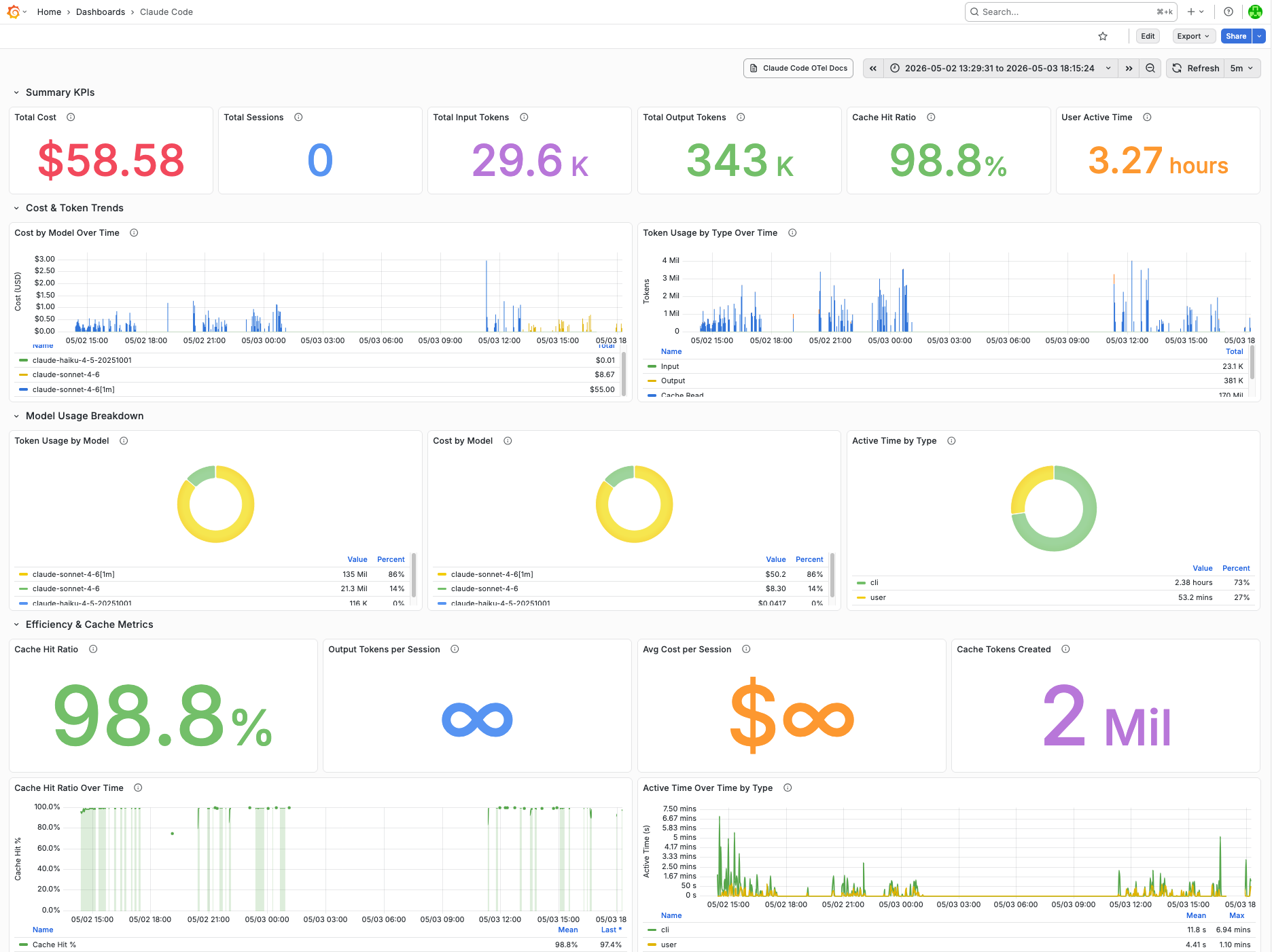
Key metrics tracked per session: claude_code_cost_usage_USD_total, claude_code_token_usage_tokens_total (by type: input, output, cacheRead, cacheCreation), claude_code_session_count_total, and claude_code_active_time_seconds_total (by type: cli vs. user). All metrics are labeled by model, enabling per-model cost attribution across Sonnet and Haiku usage within the same session.
The source code is private but the architecture is not. Questions and comments welcome.